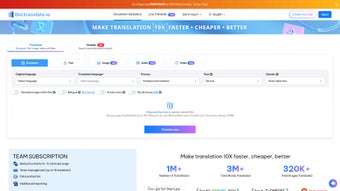

Download DocTranslate – AI‑Powered Document Translation Tool for Windows, Mac, Android & iOS
Introduction: Why DocTranslate Is Changing the Way We Communicate Across Borders
In a globalized world, the ability to translate documents quickly, accurately, and securely has become a non‑negotiable business requirement. DocTranslate steps into this space as a full‑version, AI‑driven web application that promises instant translation for a wide range of file types—Word, PDF, Excel, PowerPoint, and more. Unlike generic machine translators that often miss industry‑specific terminology, DocTranslate incorporates language detection, tone selection, and domain‑specific customization, allowing users to tailor the output to casual, technical, or marketing contexts.
The platform’s bilingual format feature, which places the original and translated text side by side, is a boon for reviewers, editors, and legal teams that need to verify accuracy without juggling multiple files. Security is baked into the workflow: files are encrypted during upload, processed on secure servers, and never stored permanently, ensuring compliance with GDPR and other privacy standards.
Whether you’re a multinational corporation preparing a quarterly report, a student needing a translated thesis, or a freelance writer looking to broaden your audience, DocTranslate offers a seamless, secure, and affordable solution. The following sections dive deep into its core capabilities, installation steps, system compatibility, and the pros and cons you should weigh before making the download.
Overview & Core Features: What Sets DocTranslate Apart
DocTranslate’s standout advantage lies in its combination of AI accuracy and user‑centric customization. The AI engine is trained on millions of parallel corpora, enabling it to understand nuanced contexts and deliver translations that read like native prose. Below is a detailed breakdown of the most compelling features.
- Multi‑Format Support: Upload Word, PDF, Excel, PowerPoint, or plain text files up to 100 MB each.
- Automatic Language Detection: The system instantly identifies source language, eliminating the need for manual selection.
- Tone & Register Selection: Choose between formal, informal, technical, or marketing tones to match your audience.
- Domain Customization: Specify a domain (e.g., legal, medical, finance) so the AI applies the appropriate vocabulary.
- Bilingual Layout Option: Generate side‑by‑side documents that display original and translated content together.
- My Dictionary: Save frequently used terms and preferred translations for instant reuse.
- Secure Cloud Processing: End‑to‑end encryption ensures that sensitive data never leaves your control.
- Batch Translation: Translate multiple files in a single queue, ideal for large projects.
- Instant Download: Receive the translated file within seconds, ready for immediate distribution.
These capabilities are wrapped in an intuitive web interface that requires no installation on the client side, yet the platform remains fully responsive on desktop and mobile browsers. The combination of AI depth, security, and user control makes DocTranslate a robust contender for any translation workflow.
Installation & Usage Instructions: Getting Started in Minutes
Because DocTranslate is a web‑based service, the “installation” process is essentially a quick account setup followed by a few straightforward steps to translate your first document. Below is a step‑by‑step guide that works on Windows, macOS, Android, and iOS browsers.
- Create an Account: Visit doctranslate.com and click “Sign Up.” You can register using an email address or via Google/Apple Single Sign‑On. A verification email is sent for security.
- Choose a Plan: While a free tier offers limited translations per month, the full‑version subscription unlocks unlimited file size, batch processing, and the bilingual layout feature. Pricing is transparent and billed annually.
- Upload Your Document: Click the “Upload” button, drag and drop your file, or select from cloud storage services like Google Drive or Dropbox. The system will automatically detect the file type and source language.
- Set Translation Preferences: In the preferences pane, select the target language, desired tone, and domain. If you have custom terminology, open the “My Dictionary” panel and add your entries.
- Start the Translation: Press “Translate.” The AI begins processing; progress is shown via a live percentage bar. For large files, the system may segment the document for faster handling.
- Review & Download: Once complete, a preview window lets you compare original and translated text (if bilingual mode is enabled). Click “Download” to receive the translated file in the same format as the original.
- Manage Your Projects: All translations are stored temporarily in the “My Projects” dashboard. You can rename, re‑download, or delete them as needed.
The user interface is designed with accessibility in mind, featuring high‑contrast mode, keyboard navigation, and screen‑reader support. If you encounter any issues, a built‑in live chat connects you with a support specialist 24/7.
Compatibility, Pros & Cons: How DocTranslate Performs Across Platforms
DocTranslate runs entirely in modern browsers, which means it is inherently cross‑platform. The service has been tested on the latest versions of Chrome, Firefox, Safari, and Edge, and it delivers consistent performance on Windows 10/11, macOS Monterey and later, as well as mobile browsers on Android 9+ and iOS 13+. Because no native client is required, you avoid the hassles of frequent software updates; the back‑end AI engine receives continuous improvements server‑side.
Pros
- Instant, High‑Quality Translation: AI model produces near‑human accuracy, especially when domain and tone are specified.
- Broad File Format Support: Handles Office documents, PDFs, and spreadsheets without needing conversion tools.
- Security‑First Architecture: End‑to‑end encryption and temporary storage meet enterprise compliance standards.
- Custom Dictionary: Saves time for recurring terminology across projects.
- Responsive Design: Seamless experience on desktops, tablets, and smartphones.
Cons
- Internet Dependency: Requires a stable connection; offline translation isn’t possible.
- Subscription Cost: Full‑version features are behind a paid plan, which may be a barrier for casual users.
- Large File Queue Times: Extremely large PDFs (>80 MB) may experience longer processing delays.
- Limited Free Tier: The free version caps the number of monthly translations, restricting occasional users.
Overall, the benefits of AI precision, security, and platform independence outweigh the minor drawbacks. For teams that need reliable, repeatable translations, DocTranslate’s subscription model offers a cost‑effective return on investment.
Frequently Asked Questions
Can DocTranslate handle confidential legal documents?
Yes. All uploads are encrypted in transit and processed on secure servers that do not retain files after the translation session ends, ensuring compliance with GDPR and other data‑privacy regulations.
What languages are supported?
DocTranslate supports over 120 languages, including major European, Asian, and African languages. Specialized dialects and regional variants are gradually added as the AI model expands.
Is there a limit to the size of files I can upload?
The free tier caps uploads at 10 MB per file. Paid subscribers can upload files up to 100 MB, and the platform automatically splits larger documents for faster processing.
Can I translate a whole folder of documents at once?
Yes. The batch translation feature lets you queue multiple files in a single job, which is especially useful for large projects such as annual reports or multi‑chapter manuals.
How does the “My Dictionary” feature work?
You can add custom terms and their preferred translations to your personal dictionary. The AI references this list during translation, ensuring consistent terminology across all your documents.
Conclusion: Should You Download DocTranslate Today?
DocTranslate delivers on its promise of fast, accurate, and secure AI translation across a broad spectrum of document types. Its blend of automatic language detection, tone control, domain‑specific vocabulary, and a bilingual layout option positions it as a premium solution for professionals who cannot compromise on quality or confidentiality. While the need for an internet connection and the subscription cost may deter occasional users, the productivity gains for businesses, academic institutions, and multilingual teams are substantial.
If you regularly work with international partners, need to localize marketing collateral, or handle technical manuals in multiple languages, the investment in DocTranslate’s full version will pay off quickly. The free tier is still valuable for testing the interface and translating short, non‑critical documents, giving you a risk‑free way to evaluate its performance.
Ready to experience seamless translation? Download DocTranslate now and start converting your documents into the languages your audience speaks—securely, instantly, and with professional polish.



.png)



